
How to create Scheduled Tasks in Plesk?
- August 15, 2021
- 0 Comments
Follow this tutorial to create Scheduled Tasks(Cron Job) in Plesk.
1. Log in to your Plesk account. (e.g., https://example.com:8443 )
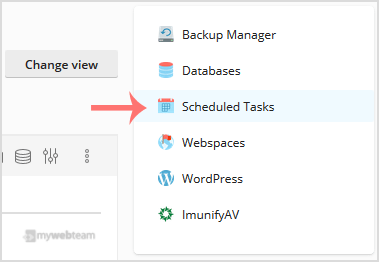
2. In the right-hand sidebar, click on Scheduled Tasks.
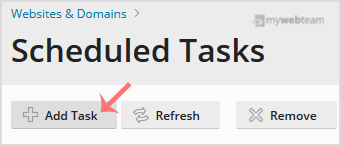
3. Under Scheduled Tasks, click on Add Task.
4. Select the following options:
Webspace: If you have multiple domains, then choose the appropriate domain from the drop-down menu.
Task Type: Choose the appropriate option as per your needs.
Command/Script Path: Depend on your choice. If you choose Task type to Run a command, then enter a command.
Run: For running your command every day, choose Daily and enter time and hour.
Notify: Select Errors only or leave this as it is.
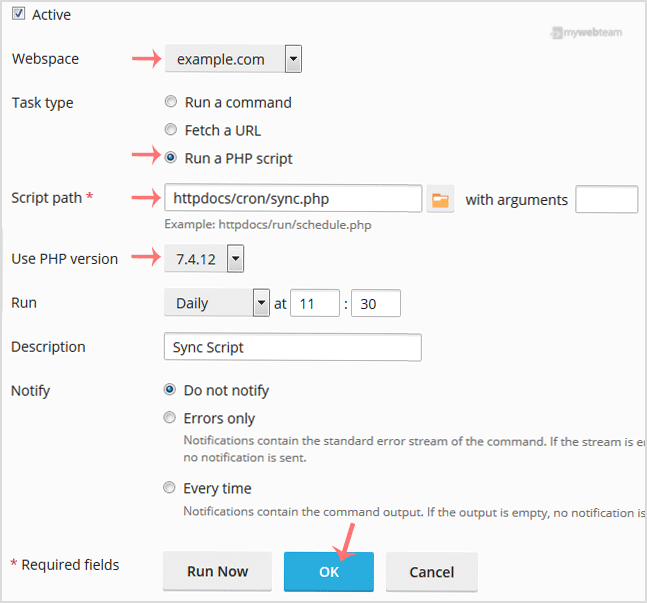
5. Click OK.
Your Task will be scheduled. You can verify that your Scheduled Task will work properly by clicking on Run Now.