How to Delete Email Messages in Outlook 2019?
- August 15, 2021
- 0 Comments
If you want to remove email from Outlook 2019, you can easily do so. However, if you use POP, the email will only be removed from your Outlook 2019 email client but will remain on your mail server.
If you use IMAP settings, the email will be removed from both your Outlook 2019 Email client and the main email server.
1. Open Outlook 2019.

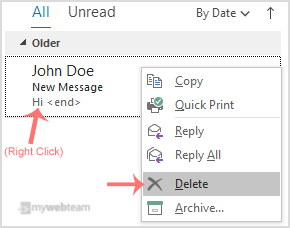
2. Go to Inbox, Right-click on the message you want to remove and click on Delete.