How to add a new category in WordPress?
- August 15, 2021
- 0 Comments
1. Login to your WordPress admin dashboard.
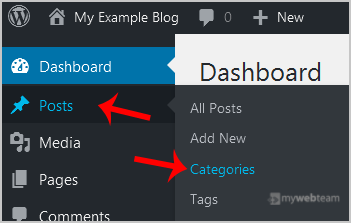
2. Under the dashboard menu, hover your mouse on Posts and then click on Categories.
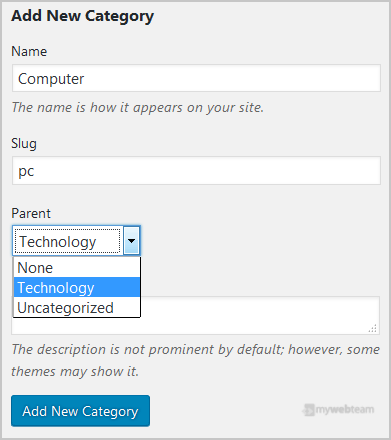
 Enter the following details in Add New Category:
Name: Enter your category name such as Computer.
Slug: Enter a slug name or leave this as it is.
Parent: Leave this to None or should you select a category, it will become a sub-category of your chosen category, and the browser will show a URL like example.com/technology/pc
Description: You can leave this as it is.
Now click on the Add New Category button.
Enter the following details in Add New Category:
Name: Enter your category name such as Computer.
Slug: Enter a slug name or leave this as it is.
Parent: Leave this to None or should you select a category, it will become a sub-category of your chosen category, and the browser will show a URL like example.com/technology/pc
Description: You can leave this as it is.
Now click on the Add New Category button.