How to Deactivate and Delete a Plugin in WordPress?
- August 15, 2021
- 0 Comments
If your plugin is not in use or you wish to deactivate it, you can do this from the WordPress admin dashboard. You can also delete deactivated plugins.
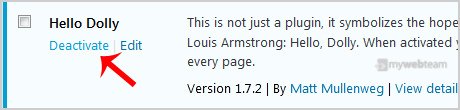
1. Login to your WordPress admin dashboard. 2. Under the dashboard menu, hover your mouse over Plugins and then click on Installed Plugins. 3. If you want to deactivate the Hello Dolly plugin, click on Deactivate, which appears at the bottom of the Hello Dolly text.
 How to Delete a Plugin in WordPress?
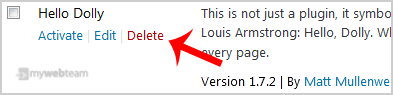
Once a plugin is deactivated, the delete option will appear.
Go to the Installed Plugins list and click on the Delete link, which shows at the bottom of the deactivated plugins name. It will display a confirmation. Press OK and the plugin will be removed.
How to Delete a Plugin in WordPress?
Once a plugin is deactivated, the delete option will appear.
Go to the Installed Plugins list and click on the Delete link, which shows at the bottom of the deactivated plugins name. It will display a confirmation. Press OK and the plugin will be removed.